
§01 HERO · SHARED FRAME - VARIANT STRINGS: H1 · EYEBROW · CRUMB · IMAGE: hero-shop-floor-management.jpg @ 62% 62%
Factory
PLATFORM / SHOP FLOOR MANAGEMENT

Shop floor management software for fab shops

See where every job is at, who is working on it and what is holding it up, without walking out to the floor to find out. Built for custom fabrication shops by people who ran one.

Built for custom fab shops of 1 to 50 people High-mix, low-volume, make-to-order Live in weeks, priced for smaller shops
Talk to us

See if Factory fits your shop.

Choose one *

{{ modeHint }}

{{ err }}

We'll never share your details

Got it. Expect our call.

We'll call you within one business day for a quick five-minute chat.

Want to pick a time instead? Book a demo
§02 IS THIS YOUR SHOP · TYPE WALL (CONCEPT 1a) · 9 CHIPS - PAGE 6 PARITY · PHOTO: paper-board-columns.jpg - THE WHITEBOARD VERSION OF WORKFLOW
IS THIS YOUR SHOP

The only way to know where a job is at is to walk out and ask.

The whiteboard says Cutting. It said that yesterday. So you walk out, find the job, find the person, and ask. The photo of the problem is on their phone, the note is on a bit of offcut, and the hours they worked on it will come in on paper on Friday. You find things out by walking the floor, and everyone else finds them out by asking you.
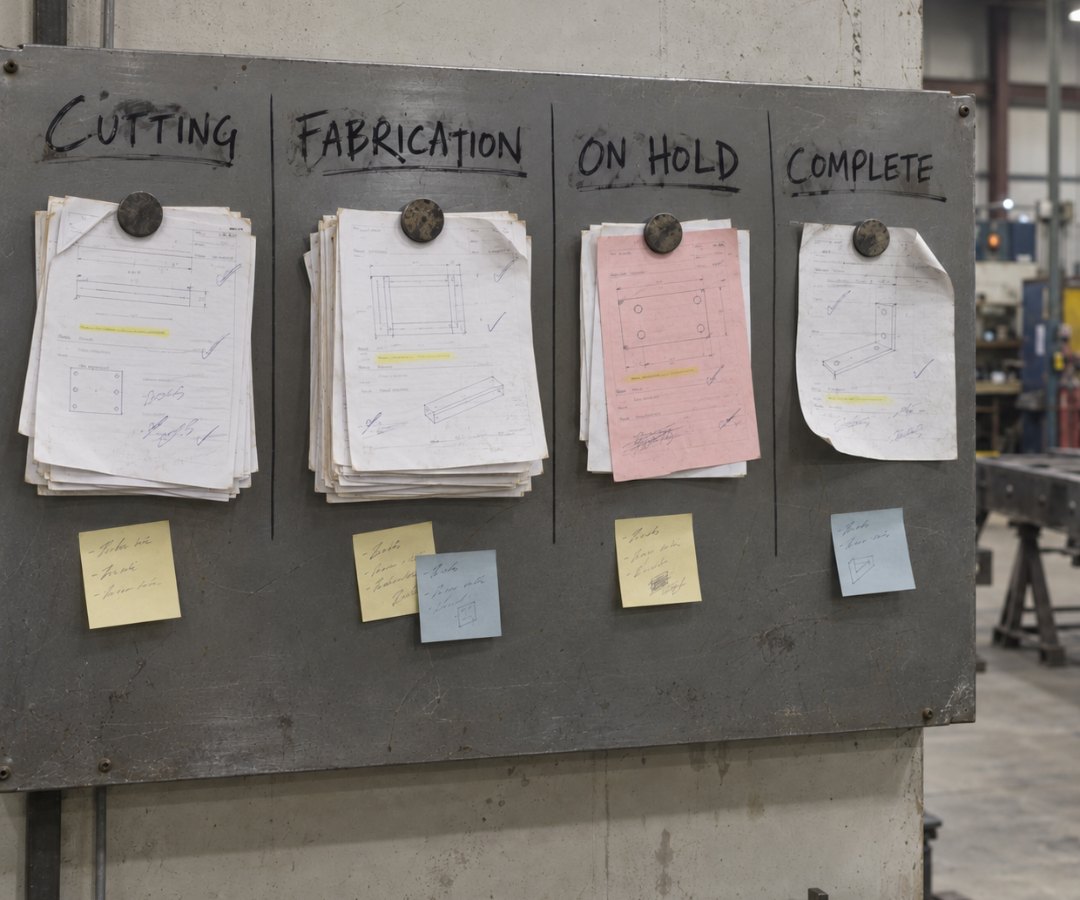
A steel shop board with CUTTING, FABRICATION, ON HOLD and COMPLETE written across the top in marker, and a wad of paper job sheets pinned under a magnet beneath each heading
READ ON IF THIS SOUNDS LIKE YOUR SHOP
1 to 50 on the floor No two jobs are the same Job status lives on a whiteboard in the shop Customers ring to ask whether their job is ready Photos and notes about a job live on someone's phone A missed step turns up at the final check Hours come in on paper on Friday Nothing gets updated till someone walks back to the office computer The delivery run gets worked out on the morning it goes out
01 · WHERE EVERY JOB IS · WORKFLOW (PRIMARY) · FOUR BULLETS (DELIBERATE) · MOCK RIGHT (VERBATIM LIFT, METAL V2 §04b)
01 / WHERE EVERY JOB IS

Every job on one board, in the stages your shop actually uses.

A board, with your stages across the top and every live job sitting as a card in one of them. Move a card and everything on it travels with it, the customer, the order number, the labels, the notes and the photos. Open a card and you are in the job itself, with the quote it came from, the hours going on it and the invoice that comes off it.

WORKFLOWName the columns whatever your shop calls them, in the order the work runs.
Track the whole job as one card, or every item on it separately when the job goes out in parts.
Save a view for a team, a production line or one person, so they only see the work that is theirs.
Automated SMS and email updates go out to the customer when a job reaches the stages you choose.
NO MORE
Walking out to the whiteboard to find out where a job is at, then walking back to ring the customer.
Workflow Search for orders... Views Filter
On Hold 1
Total$1,240.00
Galv
Order #1048 Metal Dynamics
DM
Cutting 3
Total$3,914.00
FabricationPlasma
Order #1042 Skyline Steel Mat. on order - check with Dan
IBMS
Order #1042 Conveyor support frame 1 of 3 · nested
Order #1051 Horizon Structures
RL
Fabrication 3
Total$2,806.00
UrgentWeld
Order #1035 Apex Industrial Drawings req. before Thu
MKIB
Order #1035 Dust extract hood 2 of 4 · in progress
Order #1039 Linwood Fabrication
MS
Complete 1
Total$1,180.00
Installed
Order #1021 Mercer Engineering Signed off onsite Aug 28
RL
02 · EVERYTHING SAID ABOUT THE JOB · COLLABORATE · MOCK LEFT (NET-NEW, DONOR VOCABULARY)
Order #1042 Skyline Steel CUTTING Work order
Details Items Tracking Collaborate Profitability
PL
Paul L.Office · 7:52 AM
Steel is in. Drawings are Rev C, attached. The base plate holes moved.
PDF 1042-mezz-RevC.pdf
IB
Ian B.Floor · 10:14 AM
IMG_0418.jpg IMG_0419.jpg
Columns tacked. We are 10 base plates short. @Dan K. can you check the order?
DK
Dan K.Office · 10:31 AM
Chased the supplier. Keep going on the rest and I will have a date for you this afternoon.
Write a message. @ to tag someone Send
02 / EVERYTHING SAID ABOUT THE JOB

The photo, the note and the question sit on the job, not in a text.

Something is wrong with a job. Today that is a photo on somebody's phone, a text to you, and a call to the supplier that nobody else hears. In Factory it all goes on the job instead: the photo, the question, and the answer. Six months on, it is still there.

COLLABORATEMessages about a job go on the order itself, so the office and the floor sort it out in one place.
Photos and the current drawing sit on the order too, so everyone is looking at the same thing.
Tag anyone on your team and they get notified, so the right person sees the message without being chased.
NO MORE
Scrolling back through three weeks of texts to find the photo of the bracket.
03 · WHAT IS DONE, AND WHO IS ON IT · CHECKLIST (NET-NEW) · ONE MOCK · MOCK RIGHT
03 / WHAT IS DONE, AND WHO IS ON IT

By the time you look at a job, it is already up to date.

A job can carry its own checklists. Open it and you can see what is done, who ticked each step, and who is on it right now.

CHECKLISTSBuild the template once - cut, fit up, weld, coat, final check - then put it on the jobs it fits or start a blank one on a one-off.
KIOSK MODEThe crew clock on to the job they are working on from a shared screen out on the floor, one tap on and one tap off.
The hours land on the job as it is worked, so you can see what it has taken so far instead of waiting for paper on Friday.
NO MORE
Finding out at the final check that a step got skipped, and finding out on Friday what the job took.
Order #2418 Ridgeline Engineering FABRICATION Work order
Details Items Checklist Tracking Collaborate
Mezzanine stairs Template · Structural 3 of 5
Cut to length DMMon 9:40 AM
Fit up DMTue 1:05 PM
Weld MKWed 8:50 AM
Blast and prime UP NEXT
Final check
Ticked by the person who did it, with the time. Add step
04 · IN THEIR POCKET · MOBILE APP · TWO PHONES · BOARD MATCHES §01 LANES/CARDS · THREAD IS §02’s #1042, LATER MESSAGES
9:41
Workflow My view
Cutting 2
Plasma
Order #1042 Skyline Steel
DC
Fabrication 2
UrgentWeld
Order #1035 Apex Industrial
MK
11:14
Order #1042
Skyline Steel
DK
Dan K.Office · 11:02 AM
Plates land Thursday, 7 AM. Supplier has confirmed it.
PDF 1042-supplier-confirm.pdf
IB
Ian B.Floor · 11:14 AM
Tacked the frames that are not waiting on plates. Photos on here @Dan K.
Write a message. @ to tag someone
04 / IN THEIR POCKET

The board goes wherever the crew goes.

Your crew do not sit at a desk, so the app does not either. The same jobs and the same board sit on the phone in their pocket, so an update goes on the job the moment it happens instead of being remembered later.

MOBILE APPMove the job to the next stage from the phone, and the office sees it the same minute.
Photos go on the order before anyone has walked away from the job.
The checklist and the clock are in the same app, so a step gets ticked off as it is finished.
NO MORE
Updating the whole day at once, from memory, after the work is finished.
05 · OUT THE DOOR · DELIVERY SCHEDULING · MOCK RIGHT (NET-NEW DAY VIEW BY TRUCK - CHECK AGAINST THE REAL SCREEN)
05 / OUT THE DOOR

Every delivery on one of your trucks, on a day, in order.

A finished job is not a delivered job. Someone still has to get it on a truck. This is the run sheet for your own vehicles: each job goes on a truck, on a day, in the order it goes out, and the driver has the run on their phone. Your trucks and your drivers, not a courier.

DELIVERY SCHEDULINGEvery truck has its own run for the day, and dragging a job onto one books it with the driver, in the order they will deliver it.
A booked delivery is the same job your crew just finished, so the office can tell a customer which day it is going out without asking anyone.
The customer signs on the driver's phone when it is dropped off, and the signature is on the job before the truck is back.
NO MORE
Waiting for the signed paperwork to come back on the truck before anyone can invoice the job.
Delivery scheduling Today, Thursday Filter
Backlog4
Complete
Order #1036 Northgate Rail 3 Siding Road
Complete
Order #1024 Harland Homes Lot 12, Ridge Road
Complete
Order #1044 Apex Joinery 76 Timber Street
Complete
Order #1047 Pine Creek Builders 5 Sawmill Lane
Truck 1DMDave M.4
7:30 AM Mercer Engineering Order #1021 14 Foundry Road
10:00 AM Coastal Marine Order #1019 Unit 3, 82 Quarry Street
1:30 PM Bright Signs Order #1027 227 Mill Lane, rear gate
3:15 PM Lakeside Pools Order #1031 9 Station Road
Truck 2SKSam K.3
9:00 AM Summit Sheet Metal Order #1015 61 Depot Street
11:30 AM Ridge Signs Order #1033 118 Kiln Road
2:00 PM Orchard Farm Supplies Order #1038 340 Orchard Road
Have a five minute chat with us → We will walk you through it on the kind of jobs you build.
§HO HAND-OFF · PRODUCTION SCHEDULING (PAGE 6) · WORDS ONLY, ONE TEXT LINK, NO PLANNER MOCK
PLANNING THE WEEK

The board shows you today. The Planner is where you plan the week ahead.

Same jobs, two screens. You lay the week out on the Planner: who is on what, which day, which machine. Your crew pick their jobs up off the board. When a job runs long or the material is late, you see it on the board first, and the fix is one drag on the Planner.

See production scheduling
§07 PROOF · SHARED FRAME · STAT ROW IS PAGE-SPECIFIC (300+ / 25 → 50) · NO TESTIMONIAL HERE IS ABOUT THE FLOOR - OPEN

What other fab shops say about us.

300+
shops run on Factory.
25 → 50
orders a month through the same shop, without doubling the admin.
"Factory allows me to create a work order, generate invoices, schedule deliveries, manage contacts, and notify customers all in one place."

- Academy Sheetmetal Academy Sheetmetal
"My husband, who is not technical at all, can actually jump in and do his own invoices - and now raves about it to all his mates."

- Mezcal FabricationMezcal Fabrication
"The list of things I love about Factory is long. It's helped us exponentially in our business."

- Balamara MechanicalBalamara Mechanical
"We've used it for a few years at my other business and found it seamless."

- EG RoofingEG Roofing
§03 FOUNDER STORY · SHARED - COPIED FROM THE LANDING PAGE
WHO YOU'RE BUYING FROM

We were in the same position you are.

We ran our own custom fab shop, and every tool out there was an enterprise ERP built for the big 5%, or made by people who never worked in the industry. Nothing fit shops like ours. So we built it ourselves - not just for our shop, but for every custom fab shop that's outgrown the spreadsheet but has no business buying an ERP.

"You're buying from a family that ran a fab shop for almost 50 years - and built the software it always needed."

ML Michael · ran our fab shop for 20+ yrs
The two of us, Paul and Michael - on our shop floor
§06 SET UP RIGHT · SHARED - SUMMARIZED FROM GETTING SET UP
SET UP RIGHT

A dedicated team gets you live, and stays until it's working.

Real people who've set up hundreds of fab shops. The heavy lifting is on us: we migrate your customers, suppliers, products and pricing, and build out your kits and BOMs, not dump it on your already busy crew.

4-6
WEEKS, START TO LIVE
01
WEEK 1
KICK-OFF & DATA
You're in from day one

You explore the platform while we import your customers, suppliers, products and pricing - and agree on the first problems it has to solve for you.

02
WEEKS 2-4
BUILD & TRAIN
We build it out and train your crew

Kits and BOMs built for you, then each person trained on what matters to their role - no one-size-fits-all.

03
WEEKS 4-6
GO LIVE
You go live on something real

Quotes with clear profitability, job statuses tracked, time on jobs, your accounting integrated and invoices getting paid.

ONGOING
WE KEEP GOING
Going live is the start, not the finish

No surprise bills, no being left on your own. We stay with you well past go-live.

The full story, session by session: how we get a shop set up.

§08 INTEGRATIONS · SHARED - COPIED FROM THE LANDING PAGE
INTEGRATIONS

Keep the books you already keep.

No switching, no double entry. Connect the accounting package you already run and let quotes, invoices, and payments flow straight through.


QuickBooks Online
Xero
DEVELOPER API

Need something of your own? Build it.

Our API is open, so your team can connect Factory to the other tools your shop runs on.

Talk to us about the API →
§09 FAQ · SHARED - EXCEPT Q1 KEYWORD STRING + Q2 COMPUTER EACH + Q3 CHECKLISTS (+ SCHEMA IN HEAD)
STRAIGHT ANSWERS

Questions shops ask about shop floor management software

{{ item.a }}

§10 FINAL CTA · PAGE-SPECIFIC (was the shared landing-page close)
YOUR FLOOR, ON ONE SCREEN

Stop being the only one who knows what is happening on the floor.

See your own jobs on the board, in your stages, with the notes, photos and hours sitting on them. Bring a job you are building this week and we will run it live.

See it on your own jobs →
SEM PAGE 8 · /PLATFORM/SHOP-FLOOR-MANAGEMENT · FRAMEWORK
Branch C, C2 (C3 via the AU variant). Page 6 chassis, re-synced to it Sep 7 (bullets as one flowing sentence, one mid-page CTA; one mock per section except B4, which shows the board and the Collaborate thread side by side on purpose). Five numbered beats by the searcher's questions - where every job is / everything said about the job / what is done and who is on it / in their pocket / out the door, then a words-only hand-off to production scheduling (page 6) with the page's one off-page text link. The one-record closer came off Sep 3: every beat already shows the work on the job, so the rail read as a product tour. Workflow is the main surface; Collaborate, checklists, Kiosk mode, the mobile app and Delivery scheduling are the supporting beats, in that order.
Fences: no Planner anywhere - planning the week is page 6. Customer SMS and email stage updates ARE claimed on B1 (user call Sep 7, reversing the Sep 3 fence) - check the A2P registration covers job-status messages to a shop’s customers before launch. No kiosk claim beyond one tap on, one tap off. Time here is floor visibility, not planned-vs-actual. Delivery scheduling is the shop's own vehicles only - no courier, freight, 3PL or route-optimization claim, and a day view by truck, never a week grid.
GROUNDS · dark / white / #ECEEF0 / white / #ECEEF0 / white / #ECEEF0 / white / dark / #F4F5F6 / white / #ECEEF0 / white / dark
PENDING · AU copy · a floor-visibility testimonial (§07 has none)
REGISTERED · /platform/shop-floor-management (Sep 7), superseding the old Run The Floor page · own HubSpot form pair wired (data-campaign="shop-floor-management")