
§01 HERO · SHARED FRAME - VARIANT STRINGS: H1 · EYEBROW · CRUMB · IMAGE: hero-production-scheduling.jpg @ 46% 70%
Factory
PLATFORM / PRODUCTION SCHEDULING

Production scheduling software for fab shops

The whole week on one screen: every job, on the person or machine doing it. See who is actually free before you promise a date, and move a job in seconds when the material turns up late. Built for custom fabrication shops by people who ran one.

Built for custom fab shops of 1 to 50 people High-mix, low-volume, make-to-order Live in weeks, priced for smaller shops
Talk to us

See if Factory fits your shop.

Choose one *

{{ modeHint }}

{{ err }}

We'll never share your details

Got it. Expect our call.

We'll call you within one business day for a quick five-minute chat.

Want to pick a time instead? Book a demo
§02 IS THIS YOUR SHOP · TYPE WALL (CONCEPT 1a) · SCHEDULING SYMPTOMS · PHOTO: week-board-rubbed-out.jpg · 500px COLUMN
IS THIS YOUR SHOP

The schedule is a whiteboard, and by Tuesday it is wrong.

Monday morning you write the week up. Then a delivery is late, someone calls in sick, and a customer wants their job Thursday instead of Friday. The board does not know any of that. So the real schedule goes back to living in your head, and the crew comes and asks you.
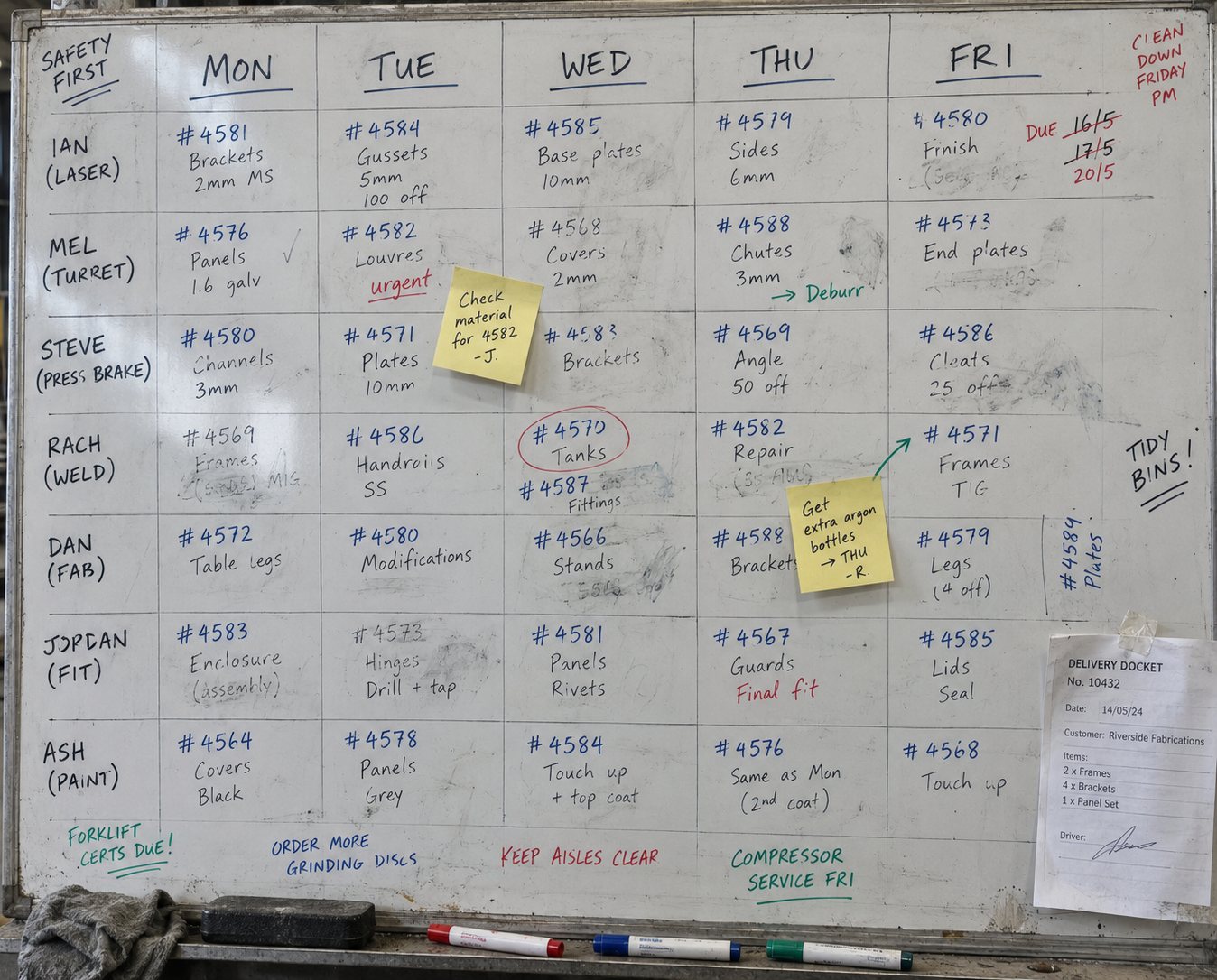
A shop whiteboard ruled up as the week: Monday to Friday across the top, seven crew and machines down the side, job numbers written in marker with a third of them rubbed out and rewritten, two sticky notes and a delivery docket taped to the corner
READ ON IF THIS SOUNDS LIKE YOUR SHOP
1 to 50 on the floor No two jobs are the same The week is planned on a whiteboard or in a spreadsheet Two jobs land on the same person, same day One late delivery means rewriting the whole board You give the customer a date off the top of your head You go looking for the folder to see what is on the job Everyone reads the whole board to find their own jobs You never find out what a job actually took
01 · EVERYTHING ON ONE BOARD · PLANNER WEEK (PAGE-OWNED) · ONE MOCK · MOCK RIGHT
01 / EVERYTHING ON ONE BOARD

Jobs, leave and machine downtime, all in one place.

Every job you have won sits on the person or the machine doing it, for the days it needs. So does everything that is not a job. If it takes time out of the week it goes on the board, so you are not planning around a day off or a machine service you cannot see.

PLANNERYour people, your teams and your machines sit in rows, and you can read the board by day, by week, or by month when you are planning further out.
Vacation leave, sick leave and machine downtime all go on as their own entries, because they take the same time out of the week that a job does.
Set a machine service to repeat and Factory tells you it is coming up, instead of the machine telling you.
NO MORE
Keeping the jobs on a whiteboard and the leave on a calendar in the office.
Planner Search for orders... Resources Day Week Month
Sep 1 - 5
Mon
1
Tue
2
Wed
3
Thu
4
Fri
5
Dave C. PERSON
6:30-3:00 PM Mezz beams and columns Order #1042 · 62 h estimated
PO-4571 · drawings approved DCMK
All day Sick leave Approved
Mark K. PERSON
7:00-3:00 PM Stair stringers and landings Order #1035 · 18 h estimated
Primer · topcoat gloss white MK
7:00-3:00 PM Mezz beams Satin black
CNC plasma MACHINE
6:30-2:00 PM Nest and cut plate Order #1051
All day Maintenance Repeats monthly
Press brake MACHINE
6:30-2:00 PM Fold trays and covers Order #1039 · 12 h estimated
Install crew TEAM
6:00-4:00 PM Plant handrail install Order #1031
Crane booked · 3 crew RLDC
MY WEEK
MO
TU
WE
TH
FR
ON MOBILE
Your crew can see their own week from their phone.
Anyone working away from the shop opens the schedule, sees what they are on, and sends their updates back without needing to call the office.
02 · LOADING THE WEEK RIGHT · RESOURCES + CAPACITY (BETA) · MOCK LEFT · OVERBOOK AND UNDERBOOK BOTH
Planner Resources BETA
CAPACITY · WEEK OF SEP 1 SCHEDULED / CAPACITY
DC Dave C. PERSON · 2 jobs 32 of 40 h 8 h free
MK Mark K. PERSON · 2 jobs 38 of 40 h 2 h free
CP CNC plasma MACHINE · 1 job 18 of 40 h 22 h free
PB Press brake MACHINE · 1 job 12 of 40 h 28 h free
IC Install crew TEAM · 3 jobs 46 of 40 h 6 h over
Install crew is over for the week. Move a job or add a day.
02 / LOADING THE WEEK RIGHT CAPACITY PLANNING IS IN BETA

Fit more work through the week without burying anyone.

Three jobs on the install crew and they are over their hours before the week starts. One of your machines has 28 hours spare, and nobody accounted for it when the work was handed out. The board shows the hours each person, team and machine already has on them, so you can see who has room before you hand out the next job, and where it fits.

Every person, team and machine shows the hours already scheduled against them, so you can see the double bookings and the empty days before the week starts.
CAPACITY PLANNINGBETAGive a person, a team or a machine a capacity and the board counts each job's estimated labor against it, so you know what is left before you promise the next one.
Moving a job is one drag, and everyone looking at the week sees the new plan straight away.
NO MORE
Promising a date on Monday and finding out on Wednesday that the crew was already booked out.
03 · THE WHOLE JOB IS ON THE ENTRY · ORDER DETAIL, LINE ITEM LEVEL · MOCK RIGHT
03 / THE WHOLE JOB IS ON THE ENTRY

Open the entry and the whole job is there, down to the line items.

What sits on the week is not a note about the job. It is the job. Open it and you have the order, every line you quoted, the drawings, the notes and the photos, without going to find the folder.

Open an entry and you are looking at the order itself, down to every line item on it.
Everything that gets added stays on the job, so the notes, the photos and the drawings are in one place instead of a folder that goes missing.
Mark a job complete and everyone looking at the week can see it is done.
NO MORE
Walking up to the office to find the paperwork that should be with the job.
Order #1042
Skyline Steel
Mark complete
FabricationPlasma ON THE WEEK · MON TO WED · DAVE C.
LINE ITEMQTYHOURSPRICE
Mezzanine beams, cut and drilled 6 18 h $4,860.00
Base plates and cleats 12 6 h $1,180.00
Handrail assemblies 4 14 h $3,240.00
Blast and paint, satin black 1 8 h $1,420.00
Delivery and install 1 16 h $2,480.00
Total 62 h $13,180.00
NOTES AND ATTACHMENTS
Check the fixing centres against Rev C before you weld. Photos of the first run attached.
Rev C drawing.pdf
ORDER #1042
Skyline Steel
+
Add a note
SIGNED FOR
Mark complete
ON MOBILE
The job gets updated where the work happens.
Notes, photos and attachments go straight onto the job, and a signature can be captured on the spot when it is handed over.
04 · READS THE WAY YOUR SHOP READS · ENTRY EDITOR · ONE MOCK · MOCK LEFT
Edit entry Order #1042
TITLE
Mezz beams and columns
LABELS
FabricationPlasmaGalv+
ASSIGNED TO
DCMKSMDave C., Mark K. and one more
COLOR
By status By assignee Set it myself
04 / READS THE WAY YOUR SHOP READS

Your labels, your colors, your view of the week.

No two shops read a week the same way. So every entry carries your labels, your colors and the people on it, and each person can open a view with only the work they need on it.

Label a job in the words your shop already uses, pick its color, and assign the people working on it.
Let Factory color the jobs by status or by who is on them, or set the colors yourself where that suits you better.
Save each person a view so anyone opening the schedule sees their own jobs instead of all forty.
NO MORE
Trying to make sense of the whiteboard when every job on it looks the same.
05 · ESTIMATED AGAINST ACTUAL · KIOSK MOCK RIGHT · EST/ACT BARS UNDER THE BULLETS · ONE MOCK
05 / ESTIMATED AGAINST ACTUAL

You scheduled 62 hours. It took 71, and you can see what those nine cost you.

The crew clock on to the job, not just to the day, so the hours land against it while it is still on the floor. Profitability then puts what you estimated next to what the job actually cost, so the nine hours you did not plan for become a number you can schedule and price the next job on.

KIOSK MODEThe crew clock on to the job they are working on from a shared screen out on the floor, one tap on and one tap off.
The hours land against the job as it is worked, so nobody is reconstructing the week from memory on Friday.
PROFITABILITYWhat you estimated against what the job actually cost, split by labor and materials.
Profitability Order #1042 · Skyline Steel
ESTIMATED
Cost $8,870
$4,310
33%
ACTUAL
Cost $9,635
GAP
$3,545
27%
Factory
3:57 PM
Wednesday, 3 September
DC
Dave C.
Ironbark Metalworks
My time records Sign out
Good afternoon, Dave.
6h 42m 18s
Today's total hours
Clocked on · Order #1042
Mezz beams and columns, since 9:12 AM
Clock off
Assigned to me All jobs
Order #1042 · Skyline Steel
FABRICATION PLASMA

Notes: check the fixing centres against Rev C before you weld.

§IT ONE RECORD · INTEGRATION CLOSER · FIVE STOPS, NO LINKS, NO CTA · STOP 02 MARKED: "YOU ARE HERE" LABEL
ONE JOB, ONE RECORD

The same job, from the quote that won it to the invoice that closed it.

Nothing gets typed in twice. The job you schedule is the same one the floor builds, the crew clock on to, and you invoice at the end.

THE QUOTE GOES OUT THE JOB IS PAID AND COSTED
KIT
01 · Quote The hours you quoted the job at are the hours the plan starts from.
YOU ARE HERE
02 · Plan The job goes onto your crew and your machines for the days it needs.
03 · Board The floor moves the same job through your stages, with the notes and photos on it.
CLOCKED ON
04 · Hours The crew clock on to the same job, and the hours land against it.
EST
ACT
05 · Paid and costed You bill the lines you quoted, and see what the job made against what you planned.
Have a five minute chat with us → We will walk you through it on the kind of jobs you build.
§HO HAND-OFF · SHOP FLOOR MANAGEMENT (PAGE 8) · WORDS ONLY, ONE TEXT LINK, NO WORKFLOW MOCK
SEEING TODAY

The Planner is the week ahead. The board is what is happening today.

Same jobs, two screens. Here you decide who is on what and which day. Once the week is set, the board is where you watch it happen and find out a job is running late while there is still something you can do about it.

See shop floor management
§07 PROOF · SHARED FRAME · STAT ROW IS PAGE-SPECIFIC (300+ / 6 WEEKS)

What other fab shops say about us.

300+
shops run on Factory.
6 weeks
for Wagga Stainless Steel to go from paper-based jobs to digital.
"Factory allows me to create a work order, generate invoices, schedule deliveries, manage contacts, and notify customers all in one place."

- Academy Sheetmetal Academy Sheetmetal
"My husband, who is not technical at all, can actually jump in and do his own invoices - and now raves about it to all his mates."

- Mezcal FabricationMezcal Fabrication
"The list of things I love about Factory is long. It's helped us exponentially in our business."

- Balamara MechanicalBalamara Mechanical
"We've used it for a few years at my other business and found it seamless."

- EG RoofingEG Roofing
§03 FOUNDER STORY · SHARED - COPIED FROM THE LANDING PAGE
WHO YOU'RE BUYING FROM

We were in the same position you are.

We ran our own custom fab shop, and every tool out there was an enterprise ERP built for the big 5%, or made by people who never worked in the industry. Nothing fit shops like ours. So we built it ourselves - not just for our shop, but for every custom fab shop that's outgrown the spreadsheet but has no business buying an ERP.

"You're buying from a family that ran a fab shop for almost 50 years - and built the software it always needed."

ML Michael · ran our fab shop for 20+ yrs
The two of us, Paul and Michael - on our shop floor
§06 SET UP RIGHT · SHARED - SUMMARIZED FROM GETTING SET UP
SET UP RIGHT

A dedicated team gets you live, and stays until it's working.

Real people who've set up hundreds of fab shops. The heavy lifting is on us: we migrate your customers, suppliers, products and pricing, and build out your kits and BOMs, not dump it on your already busy crew.

4-6
WEEKS, START TO LIVE
01
WEEK 1
KICK-OFF & DATA
You're in from day one

You explore the platform while we import your customers, suppliers, products and pricing - and agree on the first problems it has to solve for you.

02
WEEKS 2-4
BUILD & TRAIN
We build it out and train your crew

Kits and BOMs built for you, then each person trained on what matters to their role - no one-size-fits-all.

03
WEEKS 4-6
GO LIVE
You go live on something real

Quotes with clear profitability, job statuses tracked, time on jobs, your accounting integrated and invoices getting paid.

ONGOING
WE KEEP GOING
Going live is the start, not the finish

No surprise bills, no being left on your own. We stay with you well past go-live.

The full story, session by session: how we get a shop set up.

§08 INTEGRATIONS · SHARED - COPIED FROM THE LANDING PAGE
INTEGRATIONS

Keep the books you already keep.

No switching, no double entry. Connect the accounting package you already run and let quotes, invoices, and payments flow straight through.


QuickBooks Online
Xero
DEVELOPER API

Need something of your own? Build it.

Our API is open, so your team can connect Factory to the other tools your shop runs on.

Talk to us about the API →
§09 FAQ · SHARED - EXCEPT Q1 KEYWORD STRING + Q2 "DECIDE FOR ME" (+ SCHEMA IN HEAD)
STRAIGHT ANSWERS

Questions shops ask about production scheduling software

{{ item.a }}

§10 FINAL CTA · PAGE-SPECIFIC
WHEN THE WEEK CHANGES

Your week changes every day. Moving a job should take seconds.

Your people, your teams and your machines on one week, with the whole job sitting on every entry. Material late, someone off sick - move it and carry on. We will set it up with your own week and your own hours.

See it on your own jobs →
SEM PAGE 6 · /PLATFORM/PRODUCTION-SCHEDULING
Branch A + C, C1 (and A5 if it gets an ad set). Job shop v2 chassis. Five numbered beats, rebuilt Sep 6 from the product callouts: 01 everything on one board / 02 loading the week right / 03 the whole job is on the entry / 04 reads the way your shop reads / 05 estimated against actual - then the one-record closer, one mid-page CTA and a words-only hand-off to shop floor management (page 8).
Fences: nothing auto-adjusts. A person drags a job; the schedule never reschedules itself, and capacity planning weighs work but never moves it. Capacity planning is BETA and always labelled. Site work stays generic - no site measure, no erecting steel, no defined site experience anywhere. Time on this page is the loop back into the plan, never floor visibility (page 8) and never margin (profitability). The Planner is the only product surface; the Workflow board strip came off in the rebuild.
GROUNDS · dark / white / #ECEEF0 / white / #ECEEF0 / white / #ECEEF0 / white / #ECEEF0 / dark / #F4F5F6 / white / #ECEEF0 / white / dark
ONE JOB · #1042 Skyline Steel runs the Planner, the order detail, the kiosk and the hours card. 62 h scheduled, 71 h actual, $13,180.00 over five lines.
PENDING · AU copy
REGISTERED · /platform/production-scheduling (Sep 7) · own HubSpot form pair wired (data-campaign="production-scheduling")